AI Dog Dance: Create a Dancing Dog Video From a Photo
Make an AI dog dance video with a pet photo. Choose the retriever lead or pug duo, assign the right positions and review the finished clip with sound.
See what changes in a generated pet video
Watch the cat-and-dog case study, paying attention to the Shiba Inu’s face, bandana and paws. The accompanying portrait was recreated from the video and is labeled accordingly; the original uploaded image is unavailable. Use the video to understand possible motion and anatomy changes, and choose the dog reference that best matches the scene you want.
To create an AI dog dance video, start with a clear dog photo and a reference whose movement you like. The photo supplies the pet’s appearance; the source clip supplies the routine and scene. The result is fictional AI animation, not footage of a dog performing the dance.
Two useful choices in Babydoll Dance AI are a pajama-wearing retriever leading a dance and two pugs dancing together at night. They have different replacement controls, so choose the reference before uploading your photos.
Pick a lead-dog scene or a two-dog routine
Pajama retriever lead
The retriever stage reference has one foreground dog in pink heart-patterned pajamas, with two human performers behind it. Only the dog is selectable. Use the Lead dog position to request your pet in that role while preserving the backup dancers.
This is a group scene with one replacement slot. Uploading a dog photo does not request that the human performers also become dogs. If you want two of your own pets in the same video, choose the pug duo instead.
Rainy-night pug duo
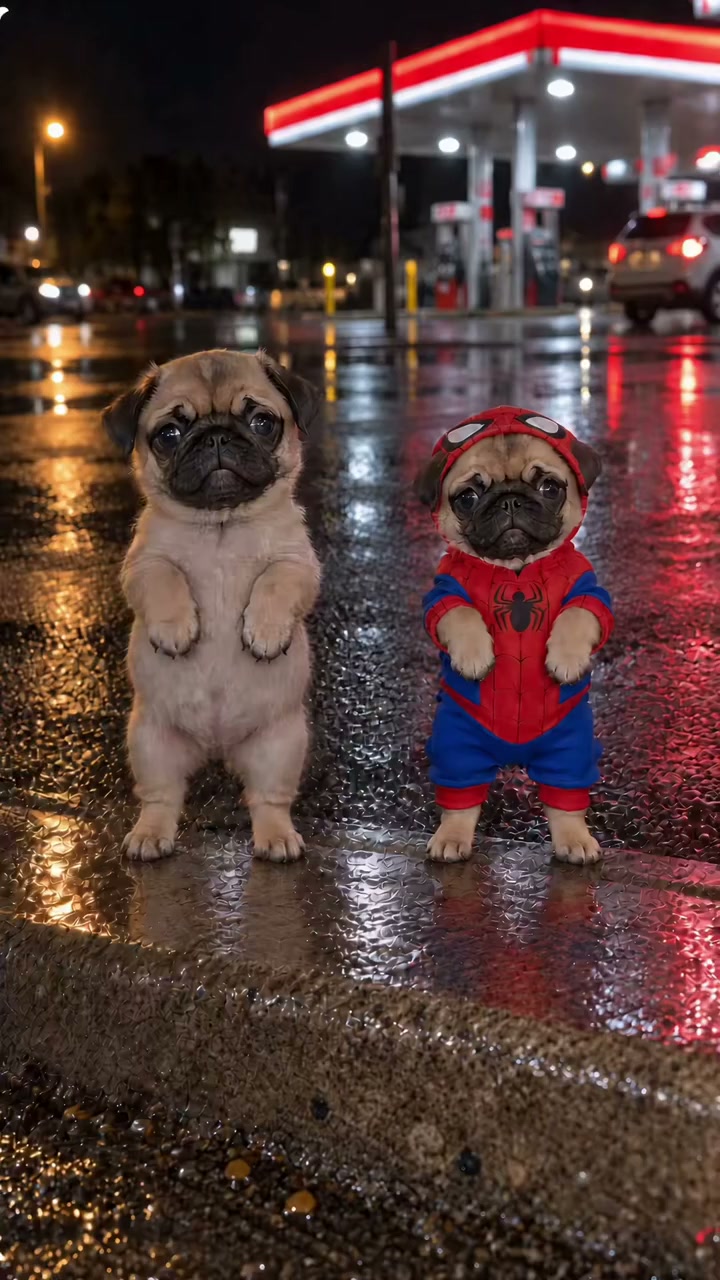
The pug duo reference shows an uncostumed tan pug on the viewer’s left and a smaller pug in a red-and-blue outfit on the right. The background is a brightly lit petrol station with reflections on wet pavement.
Both positions are selectable. Fill one individual slot to join an existing source pug, or personalize the pair with two separate pet photos or one shared photo of both dogs. The animals turn during the routine, so identify the positions from the opening shot rather than a later frame.
Both references are AI-animated clips by their credited creators. Their music comes from their own source videos; these routines do not use the Babydoll reference track.
Choose a dog photo with visible legs and paws
A full-body image helps the model interpret the pet’s size, proportions and markings. Look for an unobstructed face, distinct ears, visible legs and a clear edge between the dog and the background.
For a small or short-legged dog, avoid a camera angle that hides the paws under the chest. For a long-haired dog, choose an image where the fur does not completely merge with a rug or blanket. If a person is holding the dog, their hands can obscure the body and make the outline harder to interpret.
Use a sharp JPG or PNG under 10 MB. A standing photo is helpful when naturally available, but the dog does not need to stand on its hind legs. Do not pose your pet to imitate the preview; the animation supplies those movements.
Match the input to the intended role
Open the selected template and choose “Use this template.” Check that Pet is selected, then upload through the relevant position card.
| Your goal | Position assignment |
|---|---|
| One dog leads two human backup dancers | Retriever reference: fill Lead dog |
| Your dog joins one source pug | Pug reference: fill Left pug or Right pug |
| Two of your dogs dance together | Pug reference: fill both sides, or use One shared photo of two dogs |
The pet in an empty slot is not automatically replaced. To make a pair, inspect both uploaded thumbnails before generating. Changing the reference clears assignments, so finish choosing the routine before adding your images.
The reference supplies the camera timing. Choose Dance video background to request its setting, or My photo background to request scenery from your uploaded photo. A garden behind your dog can guide the result when My photo background is selected, although AI may change plants, lighting and other details.
Understand clothing and breed differences
The retriever’s pajamas and the right pug’s outfit are part of their source scenes. Clothing can influence the output, even when you supply a photo without that outfit. Treat the preview as a motion reference rather than a promise that every accessory will appear or disappear exactly as you expect.
Your dog does not have to be the same breed as the source. However, different body shapes can make the same upright movement harder to reconstruct. Check a long-bodied dog’s proportions carefully in a compact-pug routine, and watch the legs and paws when the model recreates fast steps.
For a cat or several pets, compare the cat dance references before deciding which routine best fits their shapes and the number of subjects you need.
Generate once, then inspect the finished clip
Watching the dog dance reference previews is free. Creating your own video requires a signed-in account and a one-time video pack, with no subscription or recurring charges. Downloading your completed video is included. Read the current video pack prices before purchasing. The built-in source preview is a 10-second vertical MP4 at 720 × 1280; the AI request is at 720p.
Once the task succeeds, the studio prepares that reference’s audio for the preview and download. If audio preparation fails, retry that step for the existing result rather than starting another generation. If the task itself is still processing, use My videos to return to it.
Watch the face through turns, the paws during raised-leg movements, and the outline where the dog overlaps other performers. A reference with backup dancers deserves an extra check that those people remain separate from the replacement pet.
Dog dance questions
Can two dogs use the same uploaded picture?
Yes, for a duo reference you can choose One shared photo and upload a clear picture of exactly two dogs once. The left dog maps to the left role and the right dog to the right role. Choose Separate photos to assign them independently or replace only one position. Filling just one individual slot leaves the other source dog in place; it does not automatically create a second copy.
Can I choose a different song?
The current creator uses the selected reference’s original soundtrack. Choose a different reference for a different routine and track. A video credit does not provide a license to third-party music.
Will it preserve my dog’s markings exactly?
No exact match is guaranteed. Clear markings in the input can help, but AI may change fur, eyes, paws and proportions. Review the full video before sharing and describe it as an AI animation rather than something your dog actually did.
Preview the pug duo or try the retriever lead to choose a starting point. For an expressive solo reaction, the Bad Times AI trend offers a credited dog reference, a human alternative, photo tips and a guide to the clip’s audio.
For a different performance, the Single Ladies dog dance replaces one lead pet while preserving two human backup dancers. The It’s My Life singing dog uses a seated car scene with a sunglasses reveal. Both pages show their complete external references and explain which pet details to inspect in the generated result.
For an upright solo, compare the towel-wearing Can I Ride pet dance with the fedora-wearing Billie Jean park dog. The first ends with an approach to the lens; the second emphasizes turns and small foot accents. Check the complete source and its actual duration before choosing your pet photo.