Photo-to-video examples
Compare the source’s three-person input collage with its complete rooftop result, then watch the separate pet reference. The people are AI-made adults; the paired example is external and remains preview-only.
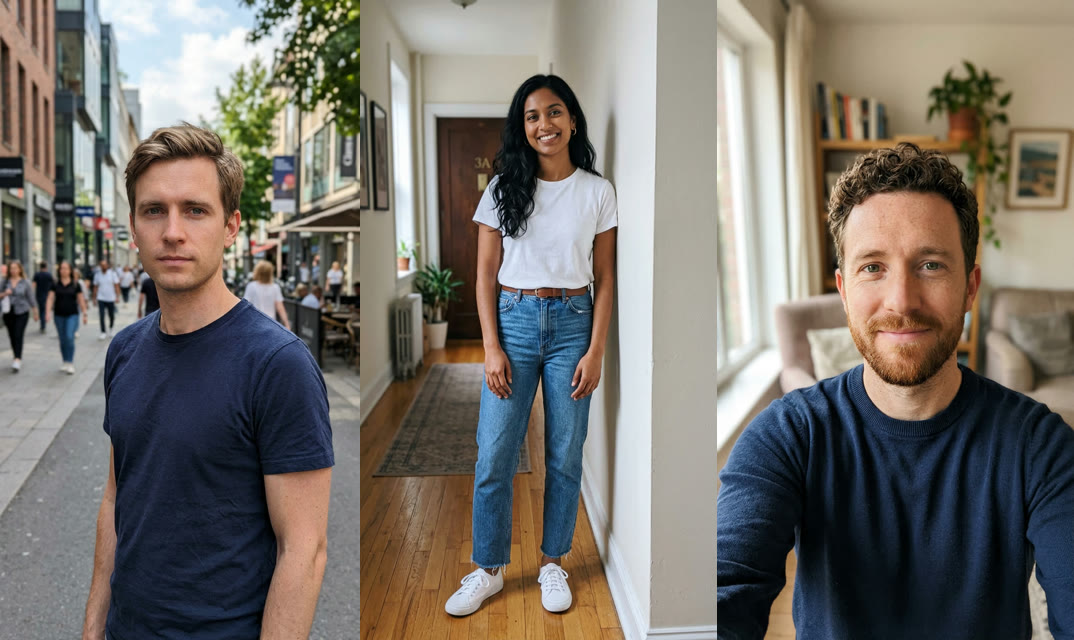
Rooftop crew · AI-made adults
The complete source input combines three AI-made adult portraits in left, center and right order. Its matching result starts with a ground-level phone view, moves into a selfie and finishes with the three-person rooftop dance. This is an external example, not a result generated by this site.
15.07 seconds · AI-made people
Preview only: the complete 15.072-second crew result exceeds the 15-second reference limit. The selectable option above uses the separate pet reference; it does not recreate this rooftop crew.
Pet dance
An AI-made pink bunny in sparkling glasses and a necklace performs paw rolls and head-level gestures in a white studio.
@highonbubbles · source reference · 14 seconds
Make your video from photos
Play the full reference and check its cast, framing and soundtrack.
Choose Create my video. Upload one clear photo to the single labeled performer position.
Check the selected roles and background, sign in and submit using one video credit.
Follow the task in My videos. Review the finished performance, prepare its reference audio and download the MP4.
Everything runs in your browser. There is no dance to learn or performance to record. Processing can take several minutes; check the existing task in My videos before submitting again.
Price and what your video includes
Each selected reference costs one video credit to personalize. Watching is free, and downloading a completed result is included. There is no subscription.
Discounted packs: Previously $9.90 $6.99 for 1 video, Previously $19.99 $16.99 for 3 videos, Previously $27.99 $24.99 for 5 videos. See Pricing for validity and purchase terms. A confirmed failed generation releases its credit; an uncertain task remains under review.
Generation is upgraded from 480p to a 720p request using Higgsfield Genjutsu Light. Credits never expire. The selected reference supplies its timing and original audio; completed downloads are MP4 files. Source preview resolution is not a guaranteed export resolution.
Choose a photo for the actual reference
Choose a clear photo of one pet with ears, body and paws visible. A normal everyday pose is enough; the reference supplies the upright dance. Keep other animals and hands out of the frame. The bunny’s sunglasses and necklace belong to the source, so use an unobstructed input face and review how accessories transfer.
The studio accepts JPG and PNG photos up to 10 MB. Choose your reference before assigning images, because changing the template clears its photo assignments. Use your own pet or photos of adults who have agreed to appear.
Where this reference comes from
The dance circulated around DJ Goja’s Mi Chico before a later collaboration with Jason Derulo and Melody. The credited bunny post is dated May 2, 2026. Subsequent crew treatments use different settings and camera work, including rooftop performances; sharing a song does not make those files interchangeable.
Historical account and measurements: Source report.
Follow the complete performance
Watch with sound before uploading. The preview retains the supplied file’s complete picture and timing; the result can still change faces, hands, clothing and small scene details.
| Part | What to watch |
|---|---|
| Start | The bunny faces the camera in the white studio. |
| Chest and paws | Small pointing and rolling gestures carry the rhythm. |
| Head-level pose | The paws rise beside or behind the head. |
| Sway | The upright body shifts with the chorus. |
Casting and caption ideas
A small pet with an especially serious face makes a playful contrast with the reference styling. Keep the caption about the animated character, for example “The smallest member of the dance club.” For a friend group, compare the rooftop example and browse the three-position routines in the catalog.
Pet reference and rooftop crew are different formats
The pet button opens one animal position with the white-studio reference. The rooftop gallery preserves the source’s separate multi-person example, including its longer duration and matching input. No result frame or poster is substituted for the input photo.
Explore pet dance templates or read our dog dance guide.
Sound and posting
The soundtrack label for this reference is Mi Chico · DJ Goja. The studio prepares the selected clip’s original audio for a completed MP4. If audio preparation needs a retry, retry that step on the existing result instead of starting a new generation.
Possible search and posting tags: #michico · #aipet · #petdance. Choose tags relevant to your version and retain any AI label required by the publishing platform. A video credit does not grant rights to the sound recording; check the platform’s music options for your intended post.
Review the result before another attempt
| Issue | What to check |
|---|---|
| Pink fur or bunny ears appear on another pet | Use a sharp full-body input and compare the entire outline; cross-species motion can retain source features. |
| The sunglasses cover the eyes | Choose an input with clear eyes and review the face through the raised-paw sequence. |
| The crew example will not appear in the picker | It is a separate 15.072-second result, above the 15-second reference limit. It remains a complete preview without being submitted or trimmed. |
Mi Chico Dance AI FAQ
Can I create the rooftop crew from this button?
The main button selects the 14-second pet reference. The rooftop result is shown separately with its matching three-person input. It is longer than the supported reference limit and is not offered as a studio reference.
Are the three people in the example real customers?
The source identifies the people as AI-made adults. The full input collage and corresponding result are retained as an external example, rather than claimed as a customer result from this site.
What does creating this video cost?
Watching references is free. Creating a video requires a signed-in account and one video credit, including multi-position edits. The pricing page lists the current one-time packs. A confirmed failed generation returns its reserved credit; a completed video with unwanted details is a different outcome.
What video format should I expect?
Generation is requested at 720p and the download is an MP4 prepared with the selected reference audio. Reference timing and framing come from the actual file shown here. The source preview is not proof of a completed generation with your photos.
Where do I find a task that is still processing?
Open My videos for the signed-in account that submitted it. Continue checking the existing task before submitting another generation. When it succeeds, review the whole clip and finish audio preparation before downloading.